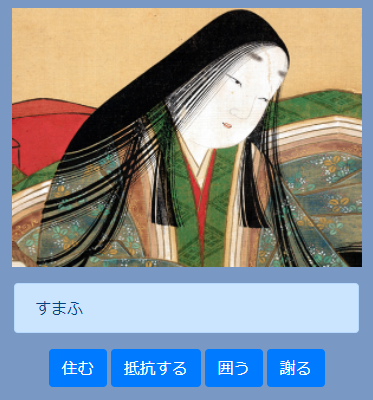
今回はYouTubeを見て勉強しました。
セイト先生のWeb・ITエンジニア転職ラボ
【JavaScript超入門講座】基礎文法だけでクイズゲームのアプリを開発!
セイト先生の動画を見て古語の問題クイズを作りました。
リファクタリングについて、とても丁寧に説明してあったのですが
勉強不足の自分は少し迷子になり、焦りました!
セイト先生ありがとう。
今回の成果物はコチラ
index.html
動画ではBootstrapの使い方も教えてくれます。
<!DOCTYPE html>
<html lang="ja">
<head>
  <meta charset="utf-8">
  <title></title>
  <meta name="description" content="">
  <meta name="viewport" content="width=device-width, initial-scale=1">

  <link rel="manifest" href="site.webmanifest">
  <link rel="apple-touch-icon" href="icon.png">
  <!-- Place favicon.ico in the root directory -->

  <link rel="stylesheet" href="https://stackpath.bootstrapcdn.com/bootstrap/4.4.1/css/bootstrap.min.css" integrity="sha384-Vkoo8x4CGsO3+Hhxv8T/Q5PaXtkKtu6ug5TOeNV6gBiFeWPGFN9MuhOf23Q9Ifjh" crossorigin="anonymous">
  <meta name="theme-color" content="#fafafa">
  <link rel="stylesheet" href="stylesheet2.css">
</head>

<body>

  <div class = "pic">
    <img src="sikibu.png" alt = "式部ちゃん" width="350px"  >
  </div>

  <div class = "container">

      <div id = "js-question" class = "mt-3 alert alert-primary" role = "alert">
        A simple primary alert-check it out!
      </div>

    <div class = "d-flex justify-content-center">
      <button type="button" class="btn btn-primary">Primary</button>
      <button type="button" class="ml-1 btn btn-primary">Primary</button>
      <button type="button" class="ml-1 btn btn-primary">Primary</button>
      <button type="button" class="ml-1 btn btn-primary">Primary</button>
    </div>

  </div>
  <script src="app.js"></script>
</body>
</html>
app.js
問題の数を増やして、最後は得点を表示するようにしました。
'use strict';

const $button = document.getElementsByTagName('button');
const length = $button.length;

const quiz =[
  // 1
  {
  question: 'すまふ',
  ansers :["住む",
           "抵抗する",
           "囲う",
           "謝る",],
  anser :  "抵抗する" ,
  },
// 2
  {
  question: 'めざまし',
  ansers :["気にくわない",
           "著しい",
           "きわだっている",
           "目が覚める",],
  anser :  "気にくわない" ,
  },
// 3
  {
  question: 'ゆくりなし',
  ansers :["騒々しい",
           "突然だ",
           "うっとうしい",
           "忙しい",],
  anser :  "突然だ" ,
  },
// 4
  {
  question: 'なめげなり',
  ansers :["泣いている",
           "無理矢理だ",
           "いい加減だ",
           "無礼だ",],
  anser :  "無礼だ" ,
  },
// 5
  {
  question: 'まめやかなり',
  ansers :["真面目だ",
           "小心者だ",
           "穏やかだ",
           "怪しげだ",],
  anser :  "真面目だ" ,
  },
  // 6
  {
  question: 'まばゆし',
  ansers :["美しい",
           "輝いている",
           "恥ずかしい",
           "羨ましい",],
  anser :  "恥ずかしい" ,
  },
  // 7
  {
  question: 'まさなし',
  ansers :["うそつき",
           "難しい",
           "つまらない",
           "よくない",],
  anser :  "よくない" ,
  },
  // 8
  {
  question: 'いつしか',
  ansers :["そのうちに",
           "早くも",
           "いつの間にか",
           "いずれは",],
  anser :  "早くも" ,
  },
  // 9
  {
  question: 'あてなり',
  ansers :["身分が高い",
           "間違いだ",
           "適当である",
           "その人物だ",],
  anser :  "身分が高い" ,
  },
  // 10
  {
  question: 'おほとのごもる',
  ansers :["遊びにいく",
           "演奏なさる",
           "おやすみになる",
           "食事をする",],
  anser :  "おやすみになる" ,
  },

];

const quizLength = quiz.length;
let quizIndex = 0;
let score = 0;

const setupQuiz = () => {
  document.getElementById('js-question').textContent = quiz[quizIndex].question;
  let buttonIndex = 0;
  while(buttonIndex < length){
    $button[buttonIndex].textContent = quiz[quizIndex].ansers[buttonIndex];
    buttonIndex++;
  }
}

setupQuiz();

const clickHandler = (e) => {
  if(quiz[quizIndex].anser === e.target.textContent){
    window.alert("正解です!");
    score++;
  } else {
    window.alert("不正解です!");
  }

  quizIndex++;

  if(quizIndex < quizLength) {
      setupQuiz();
  } else {
      window.alert(`"これでおしましいです!あなたのスコアは${score*10}点です"`);
  }
};


let handlerIndex = 0;
while(handlerIndex < length){
  $button[handlerIndex].addEventListener('click',(e)=>{
    clickHandler(e);
  });
  handlerIndex++;
};
stylesheet.css
スマホ用にしたかったので、cssでレスポンシブル対応にしてみました。
PCと両立するのが難しいです・・・。
@media (max-width: 670px) {
  body {
    margin-top: 10px;
    font-family: Verdana,sans-serif;
    background-color: rgb(121, 153, 196);
  }
.pic {
  text-align: center;
 }
}
動画を見ながら半日かけて仕上げました。
出来た時は理解できた気がしたのですが
動画なしで、もう一度作れと言われたら絶対無理ですね。
まだまだ勉強足りないです。
最後に最近少し使えるようになってきた
Githubをリンクさせて下さい。